ADB Bugreport
You can report bugs in any of these ways:
- Running the
adb bugreportcommand and downloading the resulting bug report with the Magic Leap Hub. This article tells you how to report bugs in this way. - Creating bug reports directly with the Magic Leap Hub, without running the
adb bugreportcommand. See Capture Bug Reports for more information on how to report a bugs in this way. - On the Magic Leap 2 device, using the buttons on the compute pack. For information on reporting bugs in this way, see this article in the Magic Leap Customer Care site, Generating a Bug Report.
There are cases when debugging a project with logs available from your development environment may not be sufficient. In this case, it can be useful to create and submit a bug report that can be examined more closely.
To create a bug report, use the adb bugreport command. You can run the following command to generate it and save it on your computer:
adb bugreport E:\Path\To\BugReports
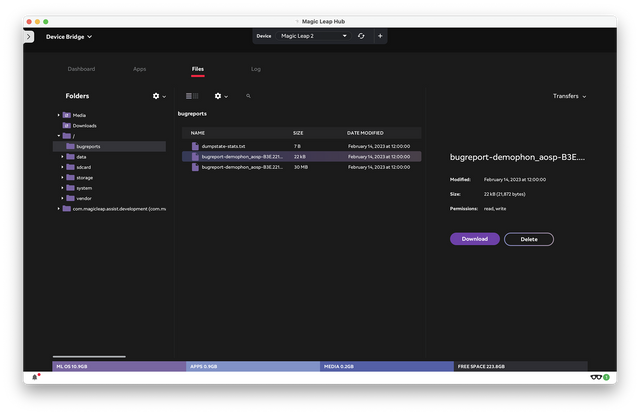
If you don't specify a path for the bug report, it is saved to the local /bugreports/ directory of the device with a path resembling, bugreport-demophon_aosp-B3E.221128.08-R.092-2023-02-14-11-59-32.zip
See Android's Bug Report documentation for more information on generating a bug report using ADB.
Download Bug Report Using ML Hub
Downloading the file is as simple as navigating to the Device Bridge, going to the Files tab, and selecting the relevant bug report: